Lock on.
Perfectly still.
Tap the thing you want to hold still — a logo, a light, a wheel. Motion Track keeps it locked in place for the whole video, even when your hands move.
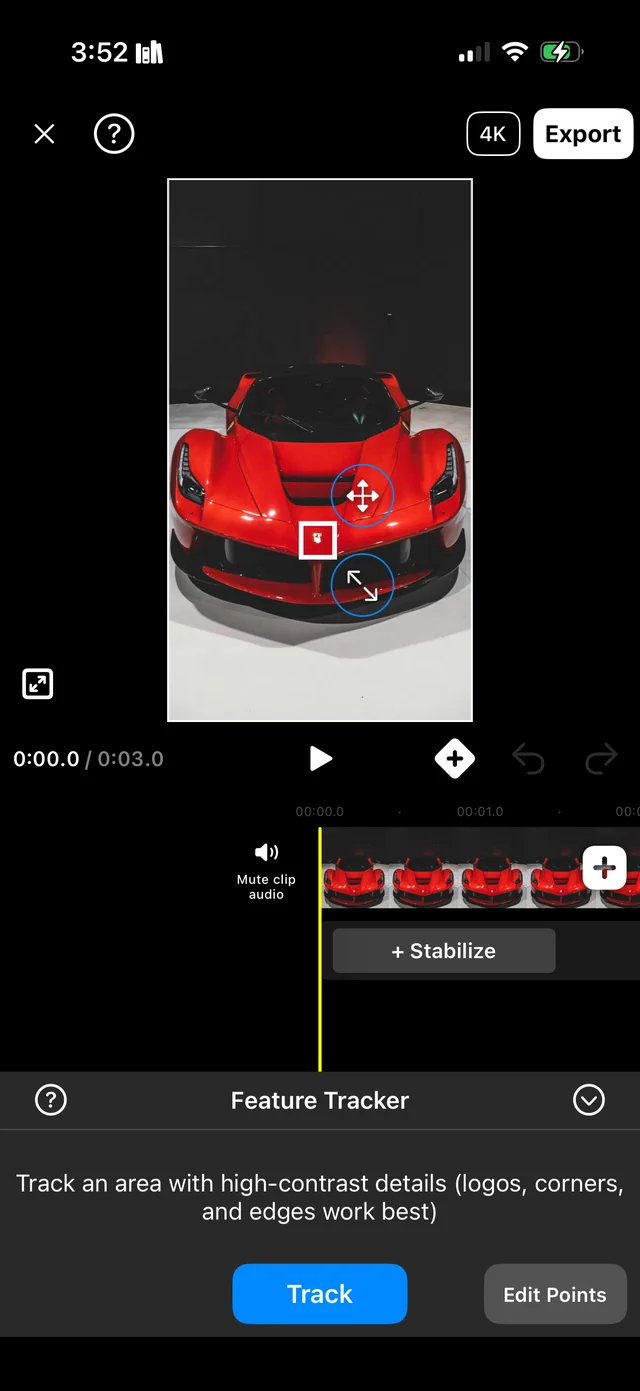
Three taps and it's locked.
-
1
Pick a spot
Put the box on something sharp and clear — a logo, a light, a sticker. Or let the app pick a spot for you.
-
2
Track it
The app follows that spot through every frame and moves the video to match. Your bike stays put while the world moves around it.
-
3
Fill the edges
Moving the video leaves empty gaps at the sides. Fill Edges covers them with a blurred copy of your own video, so you keep the full screen — no black bars.
Also in the app: Stabilize for shaky footage, speed changes, motion blur, color filters and 4K export.
How to get the shot
Everything happens on your phone. Nothing is uploaded. No account, no sign-up. Your videos never leave your phone.
Questions
- Is there an Android version?
- Yes — get it on Google Play. The Android version does the main job: tracking and stabilizing.
- How much does it cost?
- Free to download and try. You can pay to unlock the Pro features.
- Do my videos get uploaded anywhere?
- No. Everything happens on your phone.
- What do I need?
- An iPhone with iOS 16 or newer, or an Android phone with Android 10 or newer.